Version 2.23: Difference between revisions
No edit summary |
No edit summary |
||
| Line 12: | Line 12: | ||
This release includes the addition of AMPL as a supported modeling language, further improvements to the optimization module in PlanWise, changes to sapling height calculations, and bug fixes - especially to the tactical TPG in PlanWise. | This release includes the addition of AMPL as a supported modeling language, further improvements to the optimization module in PlanWise, changes to sapling height calculations, and bug fixes - especially to the tactical TPG in PlanWise. | ||
==New Features== <itemTags>feats</itemTags> | ==New Features== | ||
<itemTags>feats</itemTags> | |||
===AMPL=== | ===AMPL=== | ||
AMPL has been added as a supported modeling language in Planwise. AMPL has been added primarily because of the long building times when using ZIMPL with some large optimization problems. In many user-cases it will be easier to switch modeling language rather than trying to optimize the formulation of the optimization problem itself. AMPL requires a user license. For non-commercial use and prototyping there is a [https://ampl.com/ce/ AMPL Community Edition] which comes with restrictions when it comes to using the commercial solvers. | AMPL has been added as a supported modeling language in Planwise. AMPL has been added primarily because of the long building times when using ZIMPL with some large optimization problems. In many user-cases it will be easier to switch modeling language rather than trying to optimize the formulation of the optimization problem itself. AMPL requires a user license. For non-commercial use and prototyping there is a [https://ampl.com/ce/ AMPL Community Edition] which comes with restrictions when it comes to using the commercial solvers. | ||
Revision as of 10:04, 29 August 2024
Version 2.22.1 RC
 |
Languages: |
<startFeed />
This is a draft of release notes for a planned version of Heureka.
Summary
This release includes the addition of AMPL as a supported modeling language, further improvements to the optimization module in PlanWise, changes to sapling height calculations, and bug fixes - especially to the tactical TPG in PlanWise.
New Features
<itemTags>feats</itemTags>
AMPL
AMPL has been added as a supported modeling language in Planwise. AMPL has been added primarily because of the long building times when using ZIMPL with some large optimization problems. In many user-cases it will be easier to switch modeling language rather than trying to optimize the formulation of the optimization problem itself. AMPL requires a user license. For non-commercial use and prototyping there is a AMPL Community Edition which comes with restrictions when it comes to using the commercial solvers.
Before using the AMPL modeling language in Heureka AMPL must be installed. The path to the exectutable is the entered into the settings in Heureka (figure 1). After setup a new AMPL model can be created by using the Model Wizard in Heureka (figure 2) or changing an existing model to use AMPL instead of ZIMPL (figure 3). If the modeling language is changed user-supplied definitions need to be changed if they fail validation (figure 4). The validation of the AMPL syntax is done by Heureka and has been tested for models generated in Heureka, but some valid AMPL syntax might fail Heureka's validation . If a valid AMPL model is marked as invalid in Heureka please let us know.
One difference between standard AMPL syntax and Heureka is that parameter and contraint declarations should be skipped since the names of a model's members is derived from the name they are assigned in Heureka. A parameter with the name p1 in Heureka and the definition MidPointUsed[0]; will be translated to param p1 := midpointused[0]; in the resulting AMPL model.
-
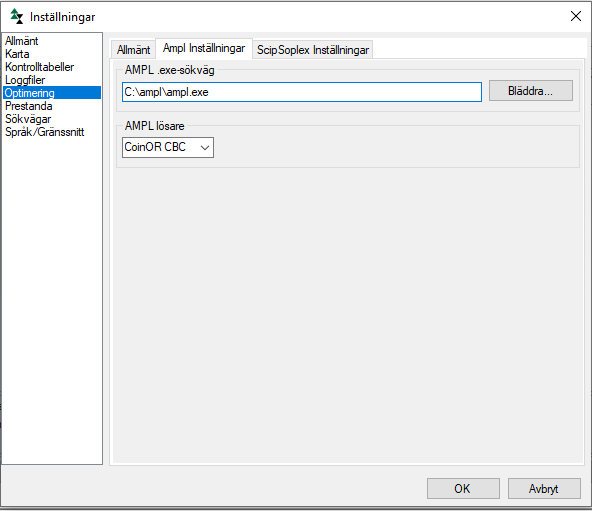 Figure 1. Before using AMPL the path to the executable need to be set.
-
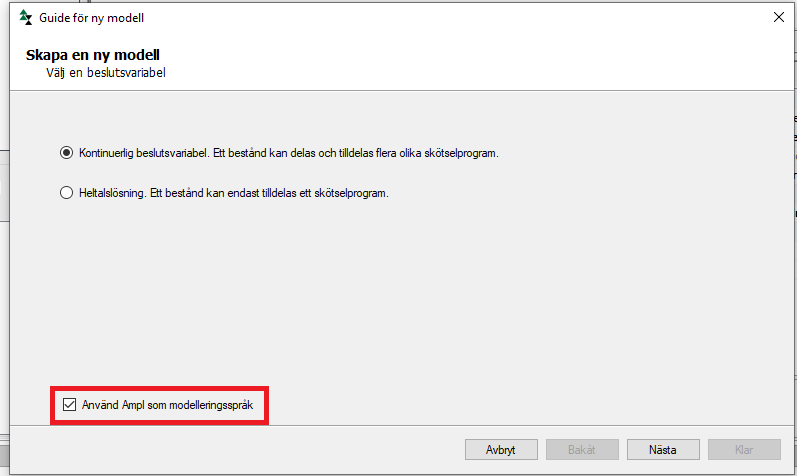 Figure 2. Creating a new model using AMPL with the Wizard.
-
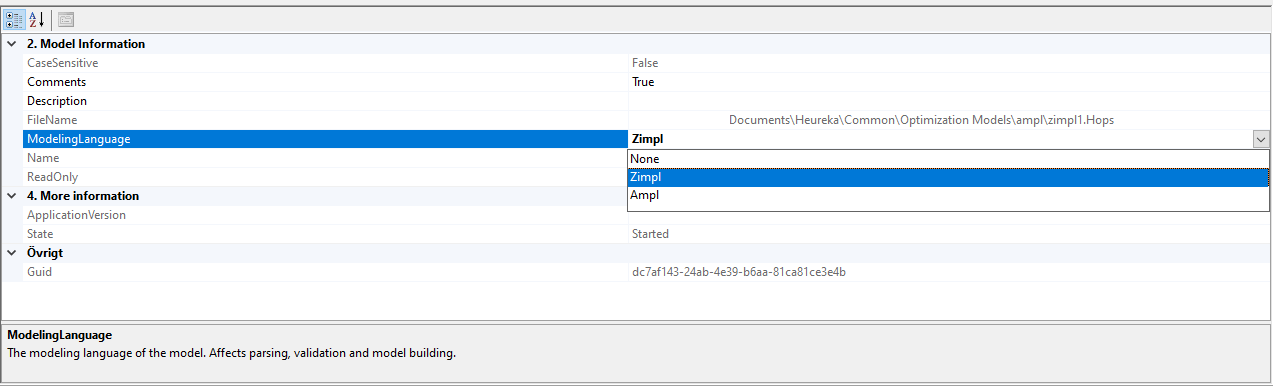 Figure 3. Changing the modeling language for selected model.
-
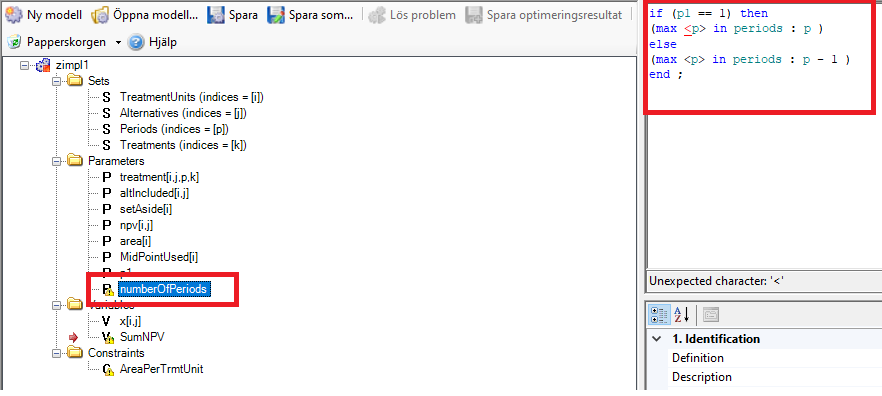 Figure 4. Model items which contain a user-supplied definition need to be changed by user.
-
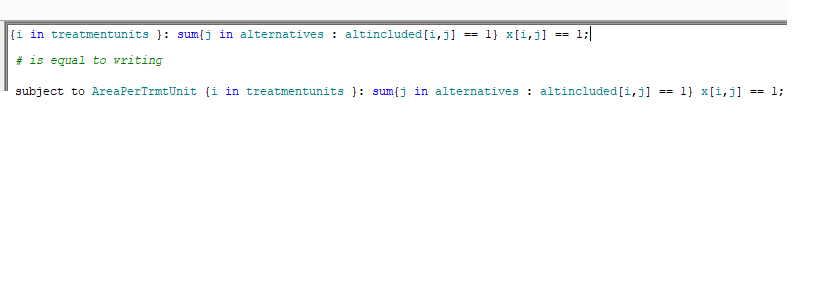 Figure 5. In models generated by the Model Wizard the constraint declaration is shortened.


- Calculations of sapling growth now uses SIH instead of SIS. If SIH is not supplied Alex Mensah's conversion functions will be applied. In most cases this is expected to lead to increased growth for saplings.
<endFeed />
Bug Fixes
- If the control table setting "Treat Retention Patches as Parent Gen. 1" is set to true dependent patches will get the same treatments as parent up until final felling.
- Fixed an issue where the tactical TPG failed to generate expected programs even though the strategic TPG could find programs with thinnings during the tactical horizon.
- Fixed an issue where an error would be displayed if project was missing a valid in-database.
- Changed stochastic mortality to be calculated per-stem instead of per type tree (which can represent multiple stems).
- Fixed an issue where stands with historic regeneration were reset when Treatment Proposals were present
- Fixed an issue were height settings for thinning were ignored in the tactical TPG.
- Changed how regeneration proposals are handled. Regeneration proposals no longer overwrite historic treatments. Instead a warning is submitted to the OutputWindow that a treatment proposal was ignored.
- Fixed an issue were the function 'Rerun simulation' failed due loading data from database.
- Fixed an issue were the Tactical TPG generated wrong treatments if several control categories were used
- Fixed an issue were loading and saving older optimization models failed due to a removed ResultProperty.
- Fixed an issue were wrong ThinningIntensity were stored in the datatable which lead to higher thinning intensity in some cases when using 'Rerun simulation'.
- Fixed a SQL Timeout when generating treelists for very large stand registers
- Changed how thinning intensity is handled in treatment proposals. The Thinning guide is now used if a user supplied value is missing in the treatment proposal.
Details from bugtracker
<mantis> status = resolved, closed resolution = fixed color = true fixed_in_version = 2.22.1 orderby = severity desc, fixed_in_version desc show = id,category,severity,summary,fixed_in_version,resolution </mantis>